


Why Modern AI Work Needs More Than a Chat Window
Artificial intelligence has changed the way people research, write, plan, design, and solve problems. Yet many AI workflows still depend on a simple conversation window. You ask a question, receive an answer, start another chat, search through old files, and repeat the process when you need related information. For larger projects, this approach can quickly become difficult to manage.
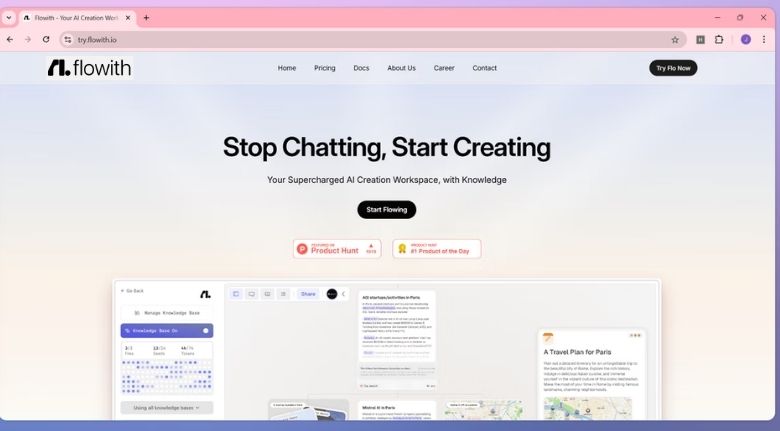
Flowith takes a different approach by combining AI assistance with a visual workspace. Its Canvas is designed to let users organize ideas, conversations, tasks, and AI-generated content in a more flexible environment. Instead of keeping every thought inside one linear conversation, users can arrange different pieces of a project and explore multiple directions.
This approach can be particularly useful for people who work with complex information. Writers, marketers, students, researchers, designers, developers, and business professionals often need to combine research, notes, documents, creative ideas, and finished outputs. Having these elements connected can make the overall workflow easier to understand and manage.
A Visual Canvas for Organizing Complex Ideas
One of the most distinctive elements of Flowith is its visual Canvas. Rather than forcing every project into a single conversation thread, the workspace allows users to create and connect different nodes. This makes it possible to separate research, ideas, drafts, references, and tasks while keeping them within the same broader project.
Flowith describes the Canvas as a space where people can visualize their thinking and collaborate with AI. This can be useful during brainstorming because an initial idea does not have to remain the only direction. Users can expand a concept, create related branches, compare possibilities, and gradually develop a more complete project.
For example, someone planning a marketing campaign could create separate areas for audience research, content ideas, campaign messages, competitor analysis, and creative concepts. Instead of switching between multiple applications, the different parts of the project can be arranged visually. This can make complicated workflows feel more manageable.
The visual approach is also valuable when a project changes direction. Ideas can be reshaped, connected, or reorganized as new information appears. Rather than deleting an earlier thought, users can keep it as part of the larger creative process and explore another possibility alongside it.
Knowledge Management With Flowith Knowledge Garden
Finding information is one challenge, but remembering and using it effectively is another. Documents, notes, research files, and previous conversations can become scattered across folders and applications. Flowith addresses this problem through its Knowledge Garden, an AI-powered knowledge management system designed to connect stored information with future work.
Flowith explains that users can import existing materials and files into the Knowledge Garden, where the system can break information into fundamental knowledge units. The goal is to create a more useful personal knowledge base instead of leaving information isolated inside individual documents. This can be especially valuable for people who repeatedly work with the same research or subject matter.
Imagine a student collecting lecture notes, research papers, study material, and project references throughout an academic year. Instead of starting from zero every time a new assignment appears, those materials can become part of a connected knowledge base. The user can then work with that information when developing new ideas or generating content.
The same principle can help professionals. A content creator could organize brand information, previous articles, research, and reference material. A marketing team could maintain campaign knowledge and supporting documents. Over time, the knowledge base can become a useful resource that supports more consistent AI-assisted work.
AI Agents Can Help Turn Ideas Into Action
Generating an answer is useful, but completing a multi-step task can require much more than producing text. Research may need to be gathered, information organized, decisions compared, and different outputs created. This is where agent-based AI can become particularly valuable.
Flowith includes Agent Neo as part of its broader AI workspace. The platform presents Neo as an AI agent designed to execute more complex workflows rather than simply responding to individual prompts. This reflects a broader shift from conversational AI toward systems that can participate in multi-step tasks.
For users, the advantage is the possibility of moving from an initial instruction toward a more complete result without manually controlling every small stage. Instead of repeatedly asking an AI what to do next, an agent can help organize the workflow and execute appropriate steps.
This can be useful for research projects, content production, business planning, website creation, presentations, and other tasks that contain multiple connected stages. The user can remain involved in the process while allowing AI to handle repetitive or time-consuming parts.
The important point is that agentic AI does not eliminate the need for human judgment. Users still need to review information, verify important details, and decide whether the final result meets their requirements. AI works best as a productivity partner rather than an unquestioned replacement for human decision-making.
One Workspace for Content, Research, and Creative Projects
Modern projects often require several different types of output. A marketing campaign might involve written copy, images, presentations, research, and a website. Traditionally, each format may be created in a different application. Constantly moving information between tools can interrupt concentration and create duplicate work.
Flowith brings several AI-powered creation capabilities into its broader workspace. Its platform highlights tools for AI images, videos, slides, websites, and agent-based workflows. This makes the environment relevant to users who need to move from an initial concept toward different types of finished material.
For a content creator, this could mean researching a topic, developing an outline, creating written material, and exploring visual concepts within a connected workflow. For a business team, the same environment could support brainstorming, research, presentation development, and project planning.
Another useful feature is the ability to choose between different AI models. Flowith has continued expanding the models available within its platform, including recent additions such as GPT-5.6, Claude Sonnet 5, and other models. Having model choices can be useful because different tasks may benefit from different strengths, whether the priority is reasoning, writing, coding, research, or speed.
How Flowith Can Support Different Types of Users
The usefulness of an AI workspace depends heavily on the person using it. A student may focus on research and knowledge organization, while a designer may care more about visual creation. A marketer may need campaign planning and content generation, while a developer may require research, coding support, and structured workflows.
Flowith can support these different scenarios because its workspace combines visual organization, AI assistance, knowledge management, and creation tools. Students can use connected research and notes to develop assignments or study projects. Writers can organize references and transform ideas into structured content. Professionals can build workflows around recurring business tasks.
For teams, a visual workspace can also provide a clearer overview of an ongoing project. Instead of relying entirely on long chat histories, important information can be arranged around the project itself. This can make it easier to understand how different ideas and tasks are connected.
However, not every task requires an advanced AI workspace. If someone only needs a quick answer to a simple question, a conventional chatbot may be sufficient. The greatest value of Flowith is likely to appear when the work involves multiple sources of information, several stages, or different forms of output.

Building a Smarter Workflow With Flowith
The biggest benefit of an AI platform is not simply the number of features it provides. What matters is whether those features help users work more effectively. Flowith’s combination of Canvas, Knowledge Garden, AI agents, multiple models, and creative tools is designed around this broader idea: thinking, creating, and executing can happen within a connected environment.
A productive workflow can begin with a simple idea. The user can develop that idea on the Canvas, bring in supporting information, organize relevant knowledge, ask AI to explore different possibilities, and then turn the strongest direction into a finished output. As the project develops, information can remain connected instead of becoming scattered across unrelated applications.
The key is to use AI intentionally. Before starting a project, it helps to define the desired outcome and identify which tasks genuinely benefit from automation. Research, brainstorming, summarization, organization, and first drafts can often be accelerated with AI, while final decisions and quality checks should remain under human control.
For people managing increasingly complex digital work, this approach can make a meaningful difference. Instead of treating AI as a separate tool that answers isolated questions, Flowith encourages users to make AI part of a larger creative and productive environment.
Ultimately, the most useful technology is the technology that helps people spend less time managing their tools and more time developing valuable ideas. By bringing visual thinking, knowledge management, AI agents, and creative generation into one environment, Flowith offers an interesting approach to modern AI-powered productivity.