


Modern teams often work across different locations, time zones, and departments. While remote and hybrid work provide flexibility, they can also make brainstorming, project planning, meetings, and information sharing more complicated. Important ideas can become scattered across chat messages, documents, spreadsheets, emails, and separate applications. When information is spread across too many places, teams can spend more time organizing their work than actually moving projects forward.
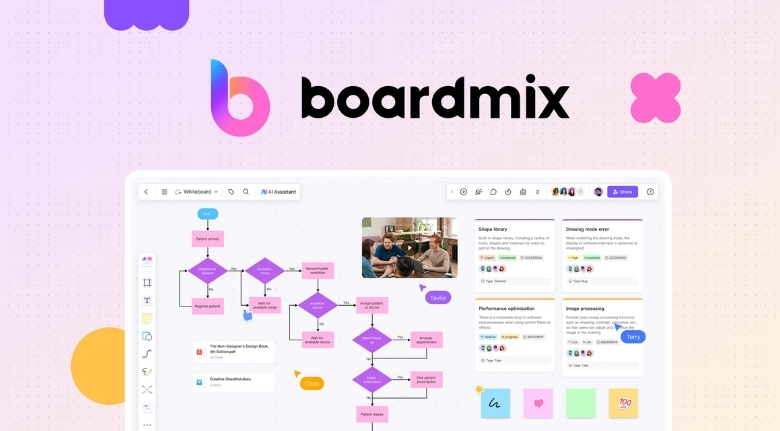
Boardmix offers an online collaborative whiteboard designed to bring visual thinking, planning, communication, and teamwork into one shared workspace. The platform combines an infinite canvas with tools for mind mapping, flowcharts, project planning, meetings, presentations, research, and AI-assisted creation. It is designed for both individual work and real-time collaboration.
For businesses, educators, designers, marketers, and project teams, a visual workspace can make complicated information easier to understand. Instead of relying entirely on long documents or conversations, users can organize ideas using diagrams, notes, tables, images, files, and other visual elements. This approach can help teams move from an initial idea to an actionable plan more efficiently.
Turning Brainstorming Into a Structured Process
Brainstorming is often the first step in developing a new product, campaign, business strategy, or project. However, ideas generated during a brainstorming session can quickly become difficult to organize. One person may suggest an idea while another adds a related concept, and soon the discussion can contain dozens of disconnected thoughts.
An online whiteboard gives teams a shared space where these ideas can be collected visually. Boardmix provides an infinite canvas that allows users to expand their workspace as ideas grow. Team members can add notes, diagrams, images, files, and other information without being restricted to a traditional document layout.
Mind mapping can make this process even more useful. A central topic can be placed in the middle of the canvas, with related ideas branching outward. This makes it easier to see relationships between concepts and identify areas that require additional research or discussion.
For example, a marketing team planning a new campaign could place the campaign goal at the center of a mind map. Branches could represent the target audience, content ideas, advertising channels, budget, timeline, and performance goals. Each branch can then be expanded with more specific information.
The result is more than a collection of random ideas. It becomes a visual representation of the team’s thinking, making it easier to identify priorities and decide which concepts should move forward.
Making Meetings More Interactive
Meetings can become inefficient when participants spend most of their time listening to presentations or taking individual notes. Interactive activities can encourage greater participation and make it easier to capture feedback from everyone.
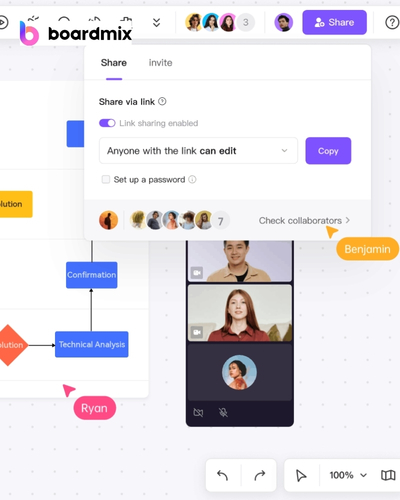
Boardmix provides tools designed specifically for meetings and workshops, including chat, reactions, timers, voting, and templates for different meeting formats. These features can support activities such as problem-solving workshops, kickoff meetings, one-on-one sessions, and onboarding activities.
A team could use a shared whiteboard during a project kickoff meeting to establish objectives, assign responsibilities, identify potential risks, and create a timeline. Instead of recording all information separately and organizing it later, participants can contribute directly to the shared workspace.
Voting can also help teams reach decisions when there are several possible options. For example, a product team could collect feature ideas and allow participants to vote on the options they believe should receive priority. This creates a visible record of the group’s preferences and can make decision-making more transparent.
Boardmix also supports integrations with meeting tools such as Zoom and Microsoft Teams, helping distributed teams combine online communication with visual collaboration.
Using AI to Accelerate Creative Work
Artificial intelligence is changing how people approach content creation, research, planning, and visual communication. Instead of starting every project from an empty page, users can use AI to generate initial ideas and structures that can then be reviewed and improved.
Boardmix combines AI capabilities with its online whiteboard environment. Its AI features can help generate mind maps, flowcharts, presentations, business model canvases, SWOT analyses, user personas, and other visual or strategic outputs.
This can be particularly useful when a team knows what it wants to achieve but does not yet have a clear structure. For example, a business owner could provide information about a new service and use AI to create an initial business model canvas. The team could then review the generated structure, add missing information, remove unnecessary elements, and turn it into a practical plan.
Boardmix also promotes AI agents designed for different professional tasks. These can assist with activities such as research, design critique, image creation, structured analysis, and writing. The platform describes more than 100 AI agents intended to support different workflows.
AI-generated content should still be reviewed by people before important business decisions are made. The strongest approach is to treat AI as a productivity assistant rather than a replacement for professional judgment.
Creating Clear Flowcharts and Diagrams
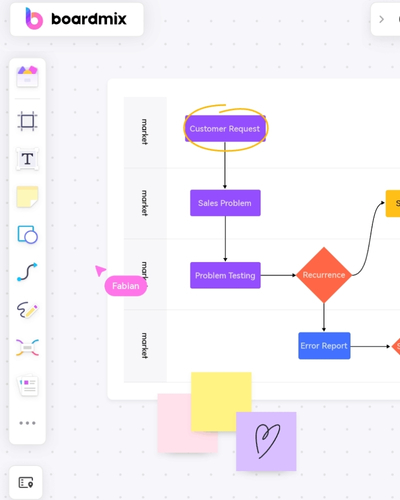
Some processes are difficult to explain through paragraphs alone. A flowchart can show how a task moves from one stage to another, where decisions need to be made, and what happens after each possible outcome.
Boardmix provides customizable flowchart templates, shape libraries, smart connectors, and automatic formatting features. Users can build diagrams on an infinite canvas and adjust their appearance according to their needs.
Businesses can use flowcharts to document customer-service processes, employee onboarding, sales procedures, software workflows, and operational systems. By making each step visible, teams can identify unnecessary stages and potential bottlenecks.
Flowcharts can also be useful for training. A new employee may find it easier to understand a process when each step is presented visually rather than described through several pages of text.
Templates can make the process faster for users who do not want to build a diagram from scratch. Boardmix provides ready-made templates that can be customized with the team’s own information.
Supporting Research and Strategic Planning
Research often involves collecting information from many different sources. Teams may work with documents, spreadsheets, websites, interview notes, images, and other materials. Keeping everything organized can become challenging when research continues for several weeks or months.
Boardmix is designed to support research and analysis by providing a central visual workspace. Users can collect and organize information, brainstorm research ideas, visualize findings, and collaborate with other team members. The platform also supports AI-assisted generation of visual materials such as mind maps, presentations, and business analysis frameworks.
Strategic planning can benefit from the same approach. Instead of writing a strategy as a long document from the beginning, teams can first map out objectives, challenges, opportunities, resources, and potential actions visually.
Templates for frameworks such as SWOT analysis, business model canvases, customer journey maps, and SMART goals can provide a useful starting point. These frameworks encourage teams to consider different aspects of a problem instead of focusing on only one perspective.
Once the strategy has been discussed and refined, the information can be transformed into a presentation or more formal document for stakeholders.
Improving Collaboration Between Remote Teams
Remote teams need more than video calls to collaborate effectively. Team members need a shared environment where they can see updates, contribute ideas, discuss changes, and access the latest version of project information.
Boardmix supports real-time collaboration and allows multiple participants to work on the same canvas. The platform’s website states that up to 500 people can collaborate simultaneously, while its research page describes support for more than 500 editors and 2,000 viewers simultaneously on the same canvas.
Comments, mentions, emojis, and chat features can help teams communicate directly within the workspace. This can reduce the need to switch constantly between a whiteboard, messaging application, and separate project document.
Version history provides another useful advantage. When a project changes significantly, teams may want to review an earlier version or restore previous work. Boardmix provides version-history functionality that allows users to create and restore versions of their files.
A centralized workspace can therefore help teams maintain continuity even when members are working from different locations.
Turning Visual Ideas Into Presentations
A brainstorming session is valuable only when the resulting ideas can be communicated and acted upon. Presentations are often the next step after planning, especially when teams need to explain their ideas to managers, clients, investors, or other stakeholders.
Boardmix includes presentation capabilities that allow users to organize visual content into presentation sequences. The platform also provides AI-powered presentation tools designed to accelerate the process of transforming information into presentation materials.
This can help reduce the gap between brainstorming and communication. Instead of recreating information in a separate application, users can build on the visual material they have already developed.
For example, a product team could begin with customer research, organize findings into a customer journey map, identify problems through brainstorming, develop potential solutions, and then turn the results into a presentation for management. Keeping these stages connected can make the overall workflow more efficient.
A Flexible Workspace for Different Teams
One reason collaborative whiteboards are useful is that their applications are not limited to a single department. Marketing teams can use them for campaign planning and customer research. Product teams can create roadmaps and prioritize features. Designers can map user journeys and conduct research. IT teams can create technical diagrams and manage agile workflows.
Educators can also use visual workspaces for lessons, study notes, assignments, and interactive learning activities. Boardmix specifically highlights online education as one of its use cases, supporting both teachers and students with visual collaboration tools.
For individuals, an online whiteboard can also become a personal thinking space. Users can organize weekly plans, study schedules, personal projects, creative ideas, or long-term goals in one flexible environment.
The key is not to use every available feature at once. Teams should choose the tools that solve their current problem. A simple mind map may be enough for an early brainstorming session, while a larger project may require diagrams, timelines, task planning, presentations, and collaborative review.
Making Work More Visual and Actionable
The biggest advantage of a collaborative whiteboard is its ability to connect ideas, information, people, and action. Instead of allowing brainstorming notes to disappear after a meeting, teams can continue developing them into plans and deliverables.
Boardmix combines visual collaboration with AI assistance, templates, real-time teamwork, presentation tools, and multiple diagramming options. Its official platform describes use cases ranging from project management and sales to marketing, IT, UX design, research, meetings, and workshops.
For businesses dealing with complex projects, this type of workspace can make information easier to understand and easier to share. For remote teams, it can create a common environment where everyone can participate. For individuals, it can provide a flexible place to organize thoughts and turn ideas into structured outputs.
Ultimately, productivity is not about using the largest number of tools. It is about creating a workflow that helps people spend less time searching for information and more time making useful decisions. A well-organized visual workspace can support that goal by bringing brainstorming, planning, research, communication, and presentation into a connected process.
Boardmix provides a flexible environment for teams and individuals who want to work more visually and collaboratively. Whether the goal is planning a project, conducting a workshop, creating a flowchart, organizing research, developing a strategy, or turning ideas into a presentation, its combination of online whiteboarding and AI-powered features offers a practical way to move from scattered thoughts toward clearer, more actionable work.