


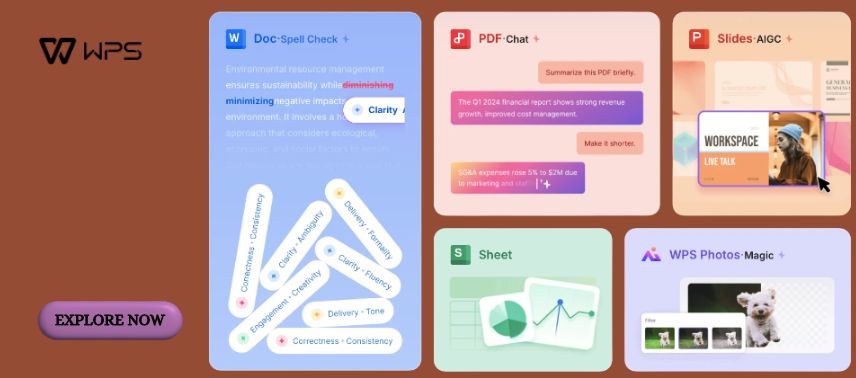
In today’s fast-moving digital environment, productivity depends on having the right tools to organise information, create professional documents, analyse data, and communicate ideas effectively. Whether you are a student preparing assignments, a professional managing business reports, a freelancer handling client projects, or an entrepreneur developing presentations, reliable office software can make everyday tasks easier. WPS Office is an all-in-one productivity suite that brings document editing, spreadsheets, presentations, PDF management, and AI-powered features into a connected workspace.
Designed to support different working styles, WPS Office offers a combination of free essential tools and optional advanced features. Its compatibility with common Microsoft Office file formats, cross-device accessibility, and integrated AI assistance make it an option for individuals and teams seeking a convenient way to manage digital work.
1. WPS Office: One Workspace for Everyday Productivity
Modern digital work often involves switching between multiple applications. A student may need to write an assignment, prepare a presentation, and organise research data, while a business professional might create reports, manage budgets, and review contracts. Using separate tools for every activity can make workflows unnecessarily complicated.
WPS Office addresses this challenge by combining several essential productivity applications within one software suite. Its core components include Writer for document creation, Spreadsheet for data management, Presentation for slide development, and PDF tools for viewing and working with digital documents.
One of the platform’s advantages is its support for widely used file formats. Users can open and edit common Word, Excel, and PowerPoint files, including DOCX, XLSX, and PPTX. This compatibility can be helpful when exchanging documents with colleagues, teachers, clients, or business partners who use different office applications.
The interface is designed to make familiar office tasks accessible without requiring extensive technical knowledge. Users can work with formatting tools, tables, charts, images, and document layouts through an organised environment.
WPS Office also supports multiple operating systems, including Windows, macOS, Linux, Android, and iOS, with availability and features varying across platforms. This flexibility allows users to work on different devices according to their needs.
For people managing several types of documents regularly, having essential tools in one environment can reduce unnecessary application switching and help maintain a more organised workflow.
2. Create Professional Documents with WPS Writer and Intelligent Writing Tools
Writing is an important part of education, business communication, and professional development. From academic assignments and resumes to business proposals and formal letters, well-structured documents help communicate information clearly.
WPS Writer, included in WPS Office, provides tools for creating, editing, and formatting text-based documents. Users can organise content with headings, paragraphs, tables, images, page numbers, and other formatting elements that contribute to a professional presentation.
For students, Writer can be useful when preparing essays, research papers, project reports, and internship documents. The ability to adjust margins, fonts, spacing, and page layouts helps users follow different academic formatting requirements.
Business professionals can use the application to develop proposals, meeting notes, reports, and correspondence. Templates can simplify the initial setup of commonly used documents, allowing users to focus on the actual content.
WPS Office also integrates AI-powered writing assistance. Depending on the available plan and feature limits, WPS AI can help generate initial drafts, summarise long documents, rewrite paragraphs, adjust tone, translate content, and suggest spelling or grammar improvements.
These capabilities can be particularly useful when reviewing lengthy reports or refining business communication. For example, a user preparing a proposal can use AI assistance to develop an outline before editing the text to match the project’s requirements.
However, AI-generated content should always be reviewed for accuracy, clarity, originality, and relevance. Automated suggestions can support writing, but they do not replace human judgment or subject knowledge.

By combining traditional document editing with intelligent assistance, WPS Office provides tools that can support more efficient writing and revision.
3. Organise Data, Manage Budgets, and Analyse Information with WPS Spreadsheet
Spreadsheets are essential for managing information that involves numbers, calculations, comparisons, and structured records. Businesses use them to monitor expenses and performance, while students and individuals rely on spreadsheets for budgets, schedules, and project tracking.
WPS Spreadsheet offers features designed to organise data into rows and columns, perform calculations, and present information visually. As part of WPS Office, it supports common spreadsheet formats, including XLS and XLSX.
Users can create tables, apply formulas, sort information, and develop charts that make numerical data easier to understand. These functions can support activities such as monthly expense tracking, inventory management, sales reporting, and academic data analysis.
For small businesses, spreadsheets can provide a practical way to monitor operational information without immediately investing in specialised software. A retailer, for example, might use a spreadsheet to record product quantities, calculate expenses, and compare monthly sales.
WPS Office also offers AI-assisted spreadsheet capabilities that can help users interpret data, generate formulas, summarise information, and create visualisations. These features may be useful for individuals who understand the outcome they want but need assistance building the appropriate calculation.
Charts can make reports more accessible by converting rows of figures into visual comparisons. Bar charts, line graphs, and other visualisations can highlight trends that might be difficult to recognise in raw data.
Nevertheless, users should verify important formulas and calculations, particularly when spreadsheets influence financial or business decisions. Compatibility with complex macros, advanced models, or specialised Excel features may also require testing.
With careful organisation and accurate data, WPS Spreadsheet can become a valuable tool for everyday analysis and decision-making.
4. Design Engaging Presentations and Communicate Ideas with Confidence
Presentations are widely used in classrooms, meetings, training sessions, and business discussions. An effective presentation should communicate important information clearly while maintaining visual consistency and audience engagement.
WPS Presentation, available through WPS Office, allows users to create slides containing text, images, charts, shapes, and other visual elements. It supports common PowerPoint file formats, making it convenient to work with existing presentation materials.
Students can use the software to prepare college projects, seminar presentations, and classroom assignments. Business professionals may develop sales pitches, marketing strategies, company profiles, and performance reviews.
The platform offers templates and design resources that can help users establish a consistent visual structure. Choosing suitable layouts, readable fonts, and balanced colours can improve the overall appearance of a presentation.
WPS Office also includes AI-assisted presentation features. Users can provide a topic, outline, or existing document and use supported AI tools to help generate slides, refine text, suggest visuals, and prepare speaker notes.
For example, a marketing professional preparing a campaign proposal could begin with a written outline and use AI assistance to organise the main ideas into presentation sections. The resulting slides can then be reviewed and customised according to the audience.
While automation can save preparation time, professional presentations still benefit from careful editing. Slides should avoid excessive text, use accurate information, and present ideas in a logical sequence.
Combining clear storytelling with suitable visual design can help transform ordinary information into a more engaging presentation.
5. Manage PDF Files, Collaborate Online, and Work Across Multiple Devices
PDF documents are commonly used for invoices, contracts, application forms, educational materials, and business reports. Their consistent appearance across devices makes them useful for sharing information, but editing or converting them may require additional tools.
WPS Office includes PDF functionality within its productivity suite. Users can read PDF documents, while eligible advanced features support editing, conversion, compression, document organisation, and electronic signatures.
Converting a PDF into an editable Word document can be useful when revising existing material. Similarly, converting documents or presentations into PDF format helps prepare files for distribution while preserving their intended layout.
Advanced PDF features may require a paid subscription, so users should check which capabilities are included in their selected plan.
Collaboration is another important part of modern productivity. WPS Office provides cloud-based document features that allow users to share files, collaborate on supported documents, leave comments, and manage changes.
These tools can benefit students working on group assignments and teams preparing shared business materials. Rather than repeatedly exchanging separate versions of a document, collaborators can work within a connected environment where supported changes are synchronised.
Cloud storage also helps users access files across compatible devices. A document started on a computer can be continued on a smartphone or another supported device when the necessary synchronisation features are enabled.
However, users should review sharing permissions and privacy settings before uploading confidential information or granting access to sensitive documents.
With document conversion, cloud accessibility, and collaboration features, WPS Office supports workflows that extend beyond traditional offline editing.

6. Explore Free Features, WPS AI, and Subscription Options for Different Needs
Cost is an important consideration when selecting productivity software, especially for students, freelancers, and small businesses. Some users need only basic document editing, while others require advanced PDF capabilities, AI assistance, and additional cloud storage.
WPS Office offers a free Standard plan that includes essential document, spreadsheet, presentation, and PDF reading features. According to its published plan information, the free tier also includes limited template downloads and 1 GB of cloud storage.
This makes the free version a practical starting point for users who primarily need to write documents, create presentations, and manage basic spreadsheets.
For individuals seeking additional functionality, WPS Office offers paid plans such as WPS Pro+. These can include advanced PDF editing and conversion tools, expanded template access, additional cloud storage, and AI features with applicable usage limits.
The platform also provides a sharing plan designed for multiple users, allowing eligible participants to access subscription benefits under the relevant terms.
Pricing and promotional conditions may vary by device, region, billing period, and current offers. Customers should compare the total subscription cost, renewal terms, feature limits, and cancellation conditions before purchasing.
One advantage of beginning with the free version is the opportunity to explore the interface and evaluate compatibility with existing files. Users can then decide whether premium functionality would meaningfully improve their workflow.
WPS Office is particularly worth considering for students preparing assignments, freelancers managing documents, small businesses creating reports, and professionals who regularly work with common office file formats.
However, organisations using highly specialised spreadsheet models, complex macros, or enterprise-specific integrations should test compatibility before replacing existing software.
Ultimately, the value of a productivity suite depends on how effectively it supports everyday work. By combining essential office applications with optional AI assistance and collaboration tools, WPS Office offers a flexible approach to document creation and digital organisation.
Whether you are writing an important report, analysing business information, designing a presentation, or managing PDF files, WPS Office provides a connected environment for completing a wide range of tasks.
With the right combination of features and responsible use of automation, individuals and teams can simplify repetitive work, improve document organisation, and dedicate more attention to the ideas and decisions that matter most.